
CreatorPack
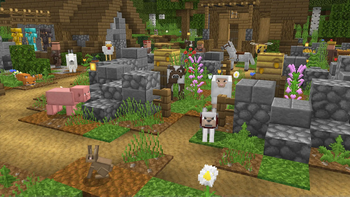
32xAre you looking for a fresh new look for Minecraft, which still keeps the traditional feeling? Then you should get the CreatorPack! Enjoy Minecraft with high definition, smooth and clean textures in every part of the game!
O paczce CreatorPack
Are you looking for a fresh new look for Minecraft, which still keeps the traditional feeling? Then you should get the CreatorPack!
Enjoy Minecraft with high definition, smooth and clean textures in every part of the game!
Instrukcja: Jak zainstalować CreatorPack?
1
Pobierz plik paczki
Kliknij przycisk „Pobierz Resource Pack (.zip)” powyżej i zapisz plik na dysku.
2
Otwórz folder w grze
Uruchom Minecraft, przejdź do: Opcje → Paczki zasobów → Otwórz folder z paczkami.
3
Przenieś plik i ciesz się grą!
Przeciągnij pobrany plik creatorpack.zip do otwartego folderu, kliknij strzałkę w prawo na liście w grze i zatwierdź przyciskiem Gotowe.