Essential UI
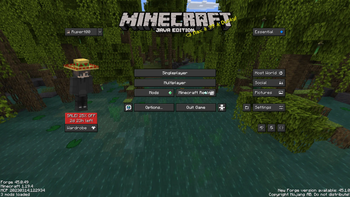
16xA small texturepack, that changes all buttons and the hotbar to fit the style of the Essential mod. With This texturepack your Minecraft will look much cleaner when using the Essential mod
O paczce Essential UI
A small texturepack, that changes all buttons and the hotbar to fit the style of the Essential mod. With This texturepack your Minecraft will look much cleaner when using the Essential mod
Instrukcja: Jak zainstalować Essential UI?
1
Pobierz plik paczki
Kliknij przycisk „Pobierz Resource Pack (.zip)” powyżej i zapisz plik na dysku.
2
Otwórz folder w grze
Uruchom Minecraft, przejdź do: Opcje → Paczki zasobów → Otwórz folder z paczkami.
3
Przenieś plik i ciesz się grą!
Przeciągnij pobrany plik essentialui.zip do otwartego folderu, kliknij strzałkę w prawo na liście w grze i zatwierdź przyciskiem Gotowe.